UK guide
IPTV subscription UK broadband: what your line needs on a busy evening
The number that matters in an IPTV subscription UK broadband check is not the headline speed on your bill but the steady speed that reaches the TV at nine in the evening. This guide explains the three kinds of line found in British homes and what each tends to deliver after dinner, how much each screen draws, how to measure on the television itself and how to push a signal through solid walls and into the extension. It ends with what to change, in order, when the line is slow.
IPTV subscription UK broadband: the speed each screen needs
Nothing has to be fitted for a plan to work: no dish, no engineer visit, no set-top box from a TV company. The channels come over the broadband you already pay for, inside a player app on the TV, stick or box, so your line and home network are the whole installation. They deserve ten minutes of checking before you order.
A live channel is a continuous flow of data. The player keeps a few seconds in reserve, so a short dip passes unseen, but if the speed stays below the stream’s rate for longer, the reserve runs dry and the picture freezes while it refills. Plan with the lowest speed the TV holds over several minutes, not the burst a speed check shows in its first second. Every IPTV subscription UK broadband question in this guide comes back to that steady number.
| Picture | Resolution | Steady speed per screen | Data per hour, roughly |
|---|---|---|---|
| HD (720p) | 1280 × 720 pixels | 5 Mb/s or so | 2.3 GB |
| Full HD (1080p) | 1920 × 1080 pixels | 10 Mb/s or so | 4.5 GB |
| 4K UHD, on programmes produced in 4K | 3840 × 2160 pixels | 25 Mb/s or so | 11 GB |
The rates are the same on Flex 3, Flex 12, Flex 12 Duo and Flex 24, which share one channel list and one picture quality. The data column matters only with a monthly allowance, rare on fixed UK lines but common on 4G and 5G home routers: a three-hour film night in Full HD uses roughly 13 or 14 GB.
Speed is one link of the 4K chain
Beyond 25 Mb/s, a 4K picture needs a set that displays 4K, fed through HDMI 2.0 or later, and an app whose HEVC (H.265) decoding runs on the device’s own chip. Above all it needs a programme produced in 4K; plenty of channels are made in Full HD and stay that way however fast the line. If your broadband comes bundled with pay TV, the guide to switching away from a TV contract covers the dates to check before giving notice.
Copper, fibre to the cabinet and full fibre: UK lines in plain terms
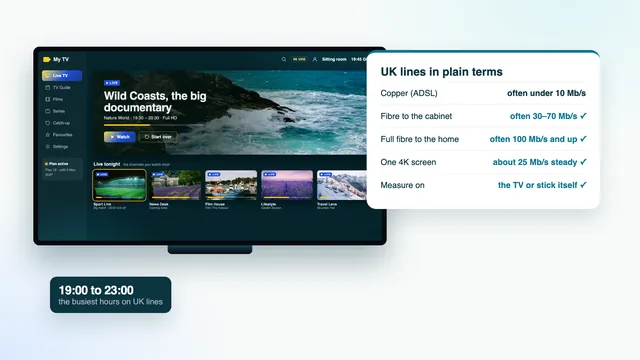
British adverts call almost everything fibre. What decides your evening speed is where the glass fibre stops and the old copper phone wire takes over; your router’s status page or an online postcode checker will show it. For IPTV subscription UK broadband planning, that one fact predicts more than the price of the line.
Copper all the way (ADSL)
The oldest connection runs over copper phone wire all the way from the local exchange. Speed falls with every hundred metres, so neighbours a few doors apart can differ, and a home far from the exchange may struggle to reach 5 Mb/s. Many ADSL homes see 3 to 15 Mb/s in the evening: Full HD on the better lines, HD on the weaker ones, 4K out of reach.
Fibre to the cabinet
Fibre reaches the green street cabinet and the last few hundred metres are still copper. Packages are often sold as up to 40 or up to 80 Mb/s, and your distance from the cabinet decides where in that range you land. Evening speeds of 30 to 70 Mb/s are common, enough on most lines for a 4K screen and a Full HD screen side by side.
Full fibre to the home
The fibre runs into the house and ends at a small box on an inside wall, with the router beside it. Speeds from 100 Mb/s to 900 Mb/s and beyond are sold, distance hardly matters and the figure tends to hold through the evening. Here the line is rarely what holds a picture back; the Wi-Fi usually is. A 4G or 5G home router is the odd one out: its speed swings with the signal and with how many people share the mast, so read it at peak time before deciding anything.
| Line | How it reaches the house | Often seen in the evening | Usually comfortable with |
|---|---|---|---|
| Copper (ADSL) | Phone wire all the way from the exchange | 3–15 Mb/s | One HD or Full HD screen |
| Fibre to the cabinet | Fibre to the street cabinet, copper for the last stretch | 30–70 Mb/s | 4K plus a Full HD screen on most lines |
| Full fibre to the home | Fibre into the house | 100 Mb/s and up | Two 4K screens with plenty to spare |
| 4G / 5G home router | Mobile signal from a nearby mast | Varies widely | Decide only after an evening reading |
Why 19:00 to 23:00 is the time to judge your line
Across Britain, home internet traffic climbs from about 19:00 and stays high until around 23:00. Saturdays, Sundays and big match nights are the heaviest, when whole streets watch the same game. A check made over breakfast flatters every line in the country.
Your own copper or fibre does not slow down at dinner time. What fills up is the shared network further along, sized for an ordinary evening rather than the busiest one, while indoors every phone, tablet and console comes online at once. A fibre-to-the-cabinet line reading 60 Mb/s at ten in the morning might read 35 at nine at night; a weak copper line can sink from 8 to 4.
So plan with the lowest evening reading and keep about a third of it spare. On our side, the load at peak hours is spread across several servers. Live channels also run a few seconds to about half a minute behind the broadcast, which is normal for internet streams.
Reading the speed where you watch: on the TV or the stick
A phone standing beside the router reports the best spot in the house; the stick behind the TV in the back room may get half that. The reading that predicts the picture comes from the device that will play the channels, where it lives.
- Add a free speed-check app from the store built into the device (Fire TV, Google TV and Apple TV each list several).
- Pick an evening between 20:00 and 22:00, ideally a Saturday or a match night.
- Run three checks a minute apart while the household carries on as normal, and keep the lowest download figure.
- Hold it against the first table plus the spare third, then repeat on a phone by the router for comparison.
Check the signal too. On Fire TV, Settings › Network shows the network in use and its signal strength; on Google TV and Android TV, Settings › Network & Internet does the same. Fifty megabits at the router and nine on the TV means the line is fine and the fix belongs between the rooms.
Wi-Fi in older UK houses
British housing is hard on wireless signals. A Victorian or Edwardian terrace often has solid brick walls inside, a chimney breast in each main room and a long, narrow plan with the phone socket by the front door, so the lounge or kitchen-diner at the back can be three walls from the router. In houses like these, the weak point of an IPTV subscription UK broadband set-up is the last few metres indoors, not the line in the street.
Solid walls, chimney breasts and the hallway router
A nine-inch brick wall soaks up far more signal than a plasterboard partition, and a chimney breast puts a column of brick and stone across the path. Before buying anything, lift the router off the hall floor onto a shelf at chest height, clear of the meter cupboard, mirrors and radiators. That alone can turn a fair signal next door into a good one.
Extensions, loft rooms and garden offices
A rear kitchen extension sits behind what used to be an outside wall, often under a steel beam; loft conversions are lined with foil-backed insulation that reflects radio waves; a garden office is another building altogether. A TV in a new extension, with the router at the front of the house, is the textbook case of a good line and a stuttering picture.
2.4 GHz or 5 GHz?
5 GHz carries more data but fades quickly through walls, so it suits a television sharing a room with the router, or just next door. 2.4 GHz reaches further but is slower and crowded by neighbours' networks in terraces and flats; use it only where 5 GHz cannot reach.
Mesh, powerline or Ethernet: bridging router and TV
Three tools close the gap between a distant router and the TV. They suit different houses, so know which problem you have before spending anything.
| Option | How it works | Suits | Watch for |
|---|---|---|---|
| Ethernet cable | A cable from a spare router port straight into the TV, the box or a stick’s adapter | Any TV a cable can reach; the steadiest choice | Most Fire TV sticks need a separate Ethernet adapter |
| Mesh Wi-Fi | Two or three units passing the signal room to room under one network name | Long or large houses where several rooms need better Wi-Fi | Place the second unit where the signal is still decent, roughly halfway |
| Powerline adapters | One adapter by the router and one by the TV, sending data through the mains wiring | One stubborn room behind thick walls or in an extension | Plug into a wall socket, not a multi-way lead; separate circuits can cut the speed |
A cable wins whenever one can reach: it ignores walls and neighbours, and gives the same speed at 21:00 as at noon. A flat Cat 6 cable of 15 or 20 metres costs very little and can be tucked beneath the edge of a carpet. Powerline is the quickest fix for one room, but in a house rewired in stages, or with the extension on its own circuit, it can disappoint, so keep the receipt until you have watched a whole evening through it.
Two screens and the rest of the household
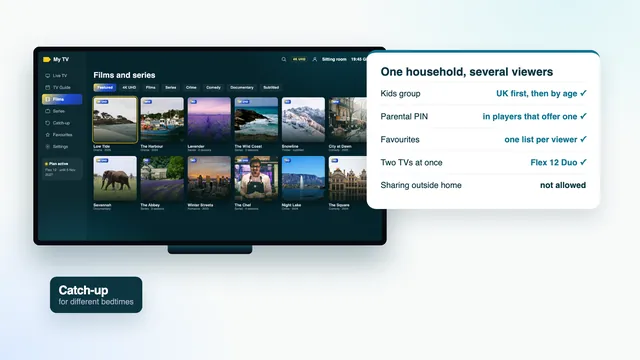
Each screen adds a stream of its own. Flex 12 Duo plays on two TVs at once, so the line carries both, added together; the figures below assume nobody else in the house is using the connection.
| Two screens playing together | Steady speed needed | Lines that usually cope |
|---|---|---|
| Full HD and Full HD | about 20 Mb/s | Fibre to the cabinet |
| 4K and Full HD | about 35 Mb/s | Fibre to the cabinet on a shorter line, full fibre |
| 4K and 4K | about 50 Mb/s | Full fibre, or a home close to its street cabinet |
Then count everyone else. Video calls, photo backups and, above all, a games console fetching an update take whatever the line has spare; on a Saturday evening one big download can halve what reaches the TV, so set updates for the early hours. The family viewing guide covers how two rooms share one plan, and the guide to sport on match days looks at the busiest evenings of the week.
On a slow line: what to change, in order
A slow line still makes for a good evening: Full HD looks fine on most televisions from the sofa, and HD is perfectly watchable on a set under 40 inches. Work down this list before blaming the line.
- Pick the lighter version. Many channels appear more than once, marked HD, FHD or 4K; on a tight line the FHD one plays without pauses.
- Shorten the path with a cable, or 5 GHz Wi-Fi from a router no more than a wall away.
- Pause the heavy traffic: downloads and backups elsewhere in the house.
- Restart the router and the stick or box. Equipment left running for months sometimes slows down.
- Give the player more in hand. Where a player offers a buffer setting, a larger buffer rides out short dips.
- Move late programmes to the morning, when the line is quiet; the catch-up guide shows where they are kept.
- Report one stubborn channel. If a single channel stalls while the rest play and your speed checks out, the source is at fault: send its name and the time through the contact page.
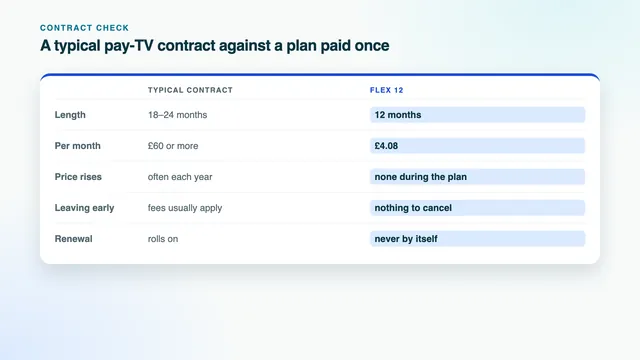
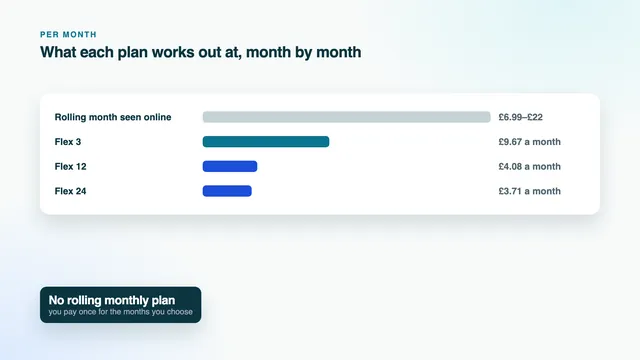
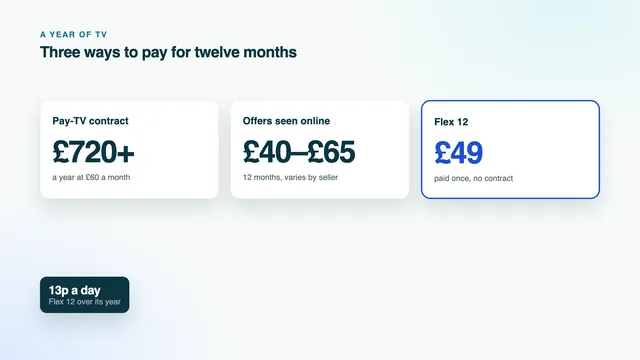
If the line is uncertain, Flex 3 is the shorter commitment: £29 for three months while you sort out the Wi-Fi. On a line you trust, Flex 12 at £49 comes to £4.08 per month, and Flex 24 lowers that to £3.71. All four are paid once, with no contract and no direct debit; compare them in the plan table or on the plans page. Once the login message arrives, the setup guide takes each screen to its first channel, and the IPTV subscription UK home page sets a plan paid once against a typical pay-TV contract.
Your IPTV subscription UK broadband check, in one line: an evening reading on the TV itself, set against 10 Mb/s per Full HD screen or 25 per 4K screen, with a third kept spare.
Frequently asked questions
What IPTV subscription UK broadband speed do I need?
Count on 10 Mb/s per Full HD picture and 25 per 4K picture, read on the TV or stick itself during the 19:00–23:00 peak. HD gets by on about 5 Mb/s. Keep roughly a third extra for the rest of the house.
Do I need full fibre for 4K?
No. Most fibre-to-the-cabinet lines hold one 4K screen comfortably. Full fibre earns its place when two 4K screens play at once in a busy household.
Why does the picture only stall in the evening?
Between 19:00 and 23:00 the shared network beyond your home is at its busiest and every device indoors is online, while the 2.4 GHz band fills with neighbours' traffic. Measure at that hour, then try a cable to see which of the two is to blame.
Will a new router fix buffering?
Only if the old one is the weak link, which is less common than it seems. In older houses the cure is usually getting past the walls with a cable, a powerline pair or a mesh unit placed halfway. Measure on the TV before and after.
Does it matter which broadband company I use?
No. The plan runs over any home connection like any other app, and your broadband stays as it is. Judge the line by an evening reading on the screen, not by its advertised speed.