UK guide
IPTV Subscription UK Sports: Weekend and Evening Matches, No Contract
This guide covers IPTV subscription UK sports from the sofa outwards: finding the match in a guide set to UK time, getting smooth motion at 50 frames per second, knowing when 4K is real, and keeping two TVs steady on the busiest evenings of the week. It is written for weekend and evening viewers who want the sport without the 18- or 24-month contract that usually comes with it.
IPTV subscription UK sports on a plan paid once
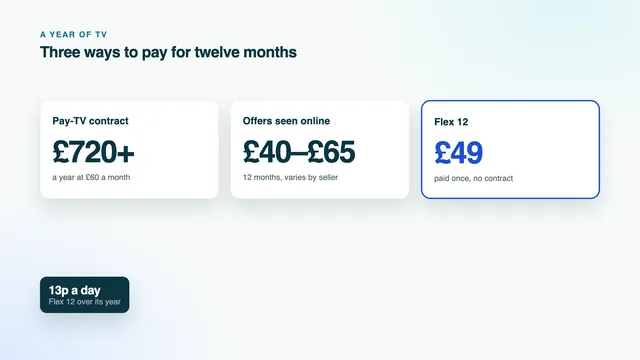
Sport is the line that drives most UK pay-TV bills up. At the time of writing, satellite and cable bundles carrying sport and films commonly cost £60 a month or above over a term of 18 to 24 months, and the price often rises each year while the contract runs. Here sport is not an add-on: every plan has identical channels, films, series and picture quality, and you pay once for the length you pick.
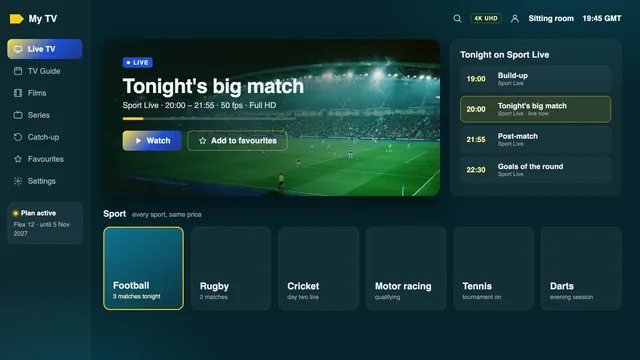
Within the British block, sport is the third group, after entertainment and news. Other countries' groups further down the list carry sport as well, with commentary in their own language; the UK group is the one with English commentary and British schedules, and the one most viewers add to favourites first.
| Plan | Length | Paid once | Per month | Screens at once | Suits |
|---|---|---|---|---|---|
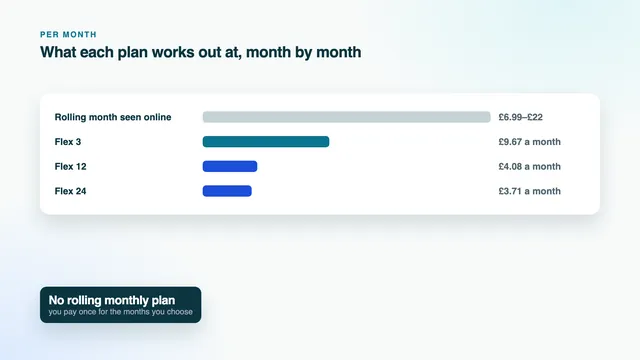
| Flex 3 | 3 months | £29 | £9.67 | 1 | One season of the sport you follow most |
| Flex 12 | 12 months | £49 | £4.08 | 1 | A full year of weekends and midweek evenings |
| Flex 12 Duo | 12 months | £79 | £6.58 | 2 | Two rooms watching different matches |
| Flex 24 | 24 months | £89 | £3.71 | 1 | Two years at the lowest cost a month |
Kick-off times in UK time
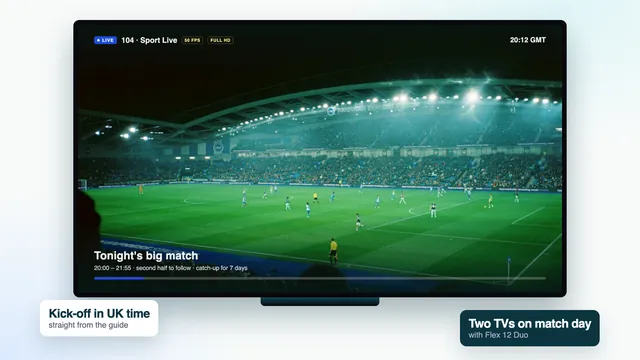
The guide that loads with your login covers seven days and shows times in UK time: GMT through the winter, BST between the clock changes in late March and late October. A match listed at 19:45 starts at 19:45 by the clock in your kitchen, wherever it is being played. That matters most for sport abroad, where a listing in local time would leave you doing sums before every event.
Two moments in the year deserve a glance. If, just after the UK clocks change, every programme sits an hour away from where it should, use the EPG time offset setting to pull the guide back into line by an hour. And North America moves its clocks on different weekends from ours, so for a few weeks each spring and autumn, events there start an hour earlier or later in UK time than usual. A guide in UK time absorbs that for you; a fixture list copied from elsewhere may not.
Finding the match
Search the guide by team, player or sport rather than by channel. Most players search programme titles, so a name brings up every listing over the coming week. Set a reminder on the one you want, and when the build-up and the live coverage are listed apart, put it on the live part.
| Sport | When it often lands in UK time | A guide habit that helps |
|---|---|---|
| Football | Weekend afternoons and early evenings; midweek from about 19:30 | Search the team name and set a reminder on the live entry |
| Rugby | Weekend afternoons, some Friday evenings | Glance at the next programme: stoppages push the finish back |
| Cricket | All day in a British summer; overnight or at dawn when played in Asia or Australasia | Use catch-up for the session you slept through, where the channel keeps it |
| Tennis | Daytime for European events; late night or early morning for the Americas and Australia | Matches on other courts often run on neighbouring channels in the sport group |
| Golf | From breakfast for European events; evening into the small hours for events in the United States | Final rounds there often finish after midnight UK time |
| Motor racing | Weekend afternoons in Europe; early morning for races in Asia and Australia | Qualifying and the race are separate entries: remind yourself of both |
| Boxing | Saturday nights; main events often after 22:00, later still when the fight is abroad | The undercard and the main event can be listed apart |
| Darts and snooker | Afternoon and evening sessions, with long days at the big events | Sessions overrun, so treat the listed end time loosely |
For reminders, the guide grid and the hour after the clocks change, our guide to the seven-day listings goes into more detail.
Smooth motion: 50 fps and frame-rate matching
British television is built on 50 pictures a second, not the 60 used in North America. Where the source sends it, live sport arrives at 50 fps, so a ball crossing the screen is drawn twice as often as in a drama made at 25. On a fast pan across a pitch or a fairway, that is the difference between a smooth glide and a picture that seems to step.
The weak link is often the device between the stream and the TV. Many sticks and boxes send 60 Hz to the screen by default. Fitting 50 frames into 60 refreshes means some frames are shown twice and others once, and a steady pan turns into a regular, rhythmic stutter called judder. It looks like a network problem. It is a setting.
Where to change it
| Device | Setting to pick | Menu |
|---|---|---|
| Apple TV | Match Frame Rate on, plus Match Dynamic Range for HDR matches | Settings › Video and Audio › Match Content |
| Fire TV | A match-frame-rate option where the model has one; otherwise a 50 Hz resolution chosen by hand | The display menu |
| Android TV or Google TV box | Frame-rate matching where offered; some players, TiviMate among them, switch the rate themselves | The box’s display menu, or playback options inside the player |
| Player app on the TV itself | Usually nothing: the set plays the stream at its own rate | The TV’s picture menu |
| Any TV | Motion smoothing off, or on its lowest step: heavy smoothing can leave halos round a fast ball | Picture settings |
To check the result, pick a slow camera pan: the long sweep across a stadium before kick-off, or the tracking shot of a golf ball in flight. If the movement is even, the chain runs at 50 Hz. A second of black screen as a channel opens is the TV switching rate, which is normal once matching is on.
4K sport: only when the match is made in 4K
Most live sport in the UK is produced in HD or Full HD. Some major matches and events are produced in 4K UHD, and only those reach 4K on your screen; a Full HD match stays Full HD however large the television. Where the list marks quality, the 4K label sits in the channel name or the guide entry, so look for it before kick-off instead of judging by eye.
A 4K TV will upscale a Full HD match, and a good set does it well. It is still a Full HD picture spread over 3840 × 2160 pixels, not a 4K one. That is why IPTV subscription UK sports coverage here is described as up to 4K: the ceiling is set by the production, not by the plan, and no plan has more 4K than another.
What a real 4K match needs at home
- A 4K TV, or a 4K stick or box on an HDMI 2.0 port or newer, with a cable rated for it.
- HEVC (H.265) decoded by the device’s own hardware, through a player that uses it. Software decoding on an older device drops frames, and fast sport shows it first.
- For every 4K screen, roughly 25 Mb/s that holds steady, read on that screen’s own device.
- HDR and Dolby Atmos only when the match carries them and your player and television can handle them.
Of Amazon’s range, the Cube and the sticks with 4K in their name handle 4K HDR when the match carries it, while the entry-level Lite and basic models go no higher than Full HD. Check the model before you plan a 4K evening around one.
Match nights and the 19:00–23:00 peak
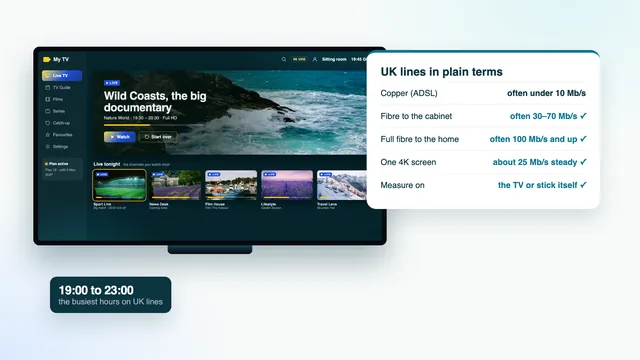
Between about 19:00 and 23:00, British broadband is at its busiest, and weekends and big match nights are the worst of it. That is the catch for IPTV subscription UK sports fans: the matches fall in exactly those hours. Your line is shared with everything else in the house, and the network beyond it with your street. At our end, the load at peak hours is spread over several servers; at home, the job is to keep enough steady speed for each screen.
How much speed each screen needs
Allow about 5 Mb/s for an HD match and around 10 for Full HD; a 4K screen wants about 25 on its own. The word that matters is steady: a line that reaches 60 Mb/s at noon and dips below 20 at half past eight cannot hold a 4K match through the second half.
Measure where the picture plays
Check the speed on the television or the stick itself, in the evening hours, not with a phone held next to the router at lunchtime. A phone a metre from the router tells you about the router; the stick behind the TV in the far room is the one carrying the match.
Cable first, then 5 GHz
Ethernet is the steadiest link for a match. Where a cable will not reach, a 5 GHz Wi-Fi connection does fine if the TV is close to the router, and powerline adapters or a mesh system help when the router lives two rooms and a staircase away. Fibre to the cabinet and fibre to the home both matter, but on match night the last few metres between router and TV cause more trouble than most people expect. The broadband guide walks through both.
If it stutters at a key moment
- Pause anything big: downloads, cloud backups, a second stream in another room.
- Swap a 4K channel for the same match in Full HD, where both are listed; it needs well under half the speed.
- Close the player completely and reopen it, which starts a fresh connection.
- If every channel still breaks up, note the channel and the time and message the team with both.
Two TVs on match day with Flex 12 Duo
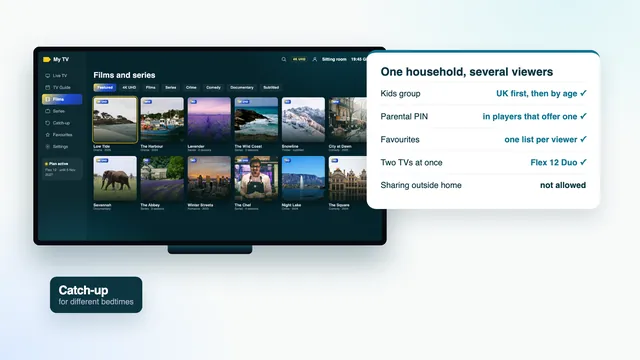
Flex 12 Duo covers two TVs watching at once for 12 months, at £79 paid once, or £6.58 a month across the plan. Flex 3, Flex 12 and Flex 24 each drive one TV at a time. On a Saturday with rugby in the lounge and football in the kitchen, or a 4K match on the big TV and an earlier kick-off upstairs, Duo is the plan that lets both rooms watch live.
Two screens double what the house asks of the line. Add the figures for the two pictures, then leave room for everything else that runs at the same time:
| Steady speed for the pair | Lounge | Second room | Notes |
|---|---|---|---|
| roughly 50 Mb/s | 4K | 4K | Wire both if you can: this is the pairing the evening peak strains most |
| roughly 35 Mb/s | 4K | Full HD | Put the 4K match on the screen nearest the router |
| roughly 20 Mb/s | Full HD | Full HD | Within reach of many UK lines, wired or on 5 GHz Wi-Fi |
| roughly 15 Mb/s | Full HD | HD | A sensible pairing when the second TV sits on older Wi-Fi |
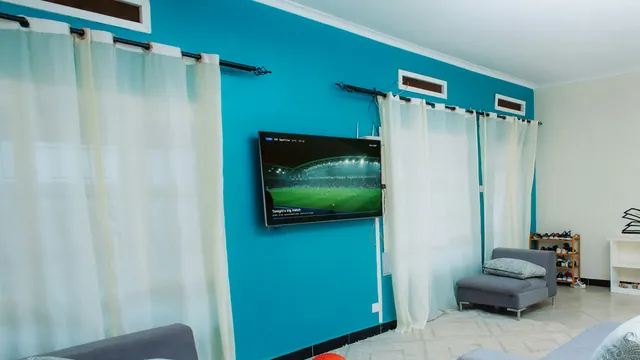
Duo is for two screens in the same home. A login used outside the household can be suspended, so it is not a way to split a plan with a friend across town. The guide for families covers favourites and the parental PIN for each room.
Why the stream runs behind the broadcast
A live stream is encoded, carried across the internet and buffered by your player before you see it. Each step adds a little time, so the picture typically reaches you somewhere between a few seconds and half a minute after the same moment goes out on an aerial or a dish. That gap is normal and is not a fault on your line. It only matters when something else tells you the result first:
- Score alerts on your phone. Turn off sport notifications for the length of the match, or the goal reaches your wrist before it reaches the TV.
- Live text and social feeds. They follow the broadcast picture, so they run ahead of you.
- Neighbours with an aerial. A cheer through the wall before the shot is even taken is the delay, not your imagination.
- The radio. Radio commentary is usually ahead of any stream; mute it or live with the gap.
Some players let you set a buffer size. A larger buffer smooths a busy evening at the cost of a few more seconds; a smaller one keeps you closer to live but has less in reserve when the line dips. On a steady wired connection, the default is usually the right balance.
Watching it later
If an overnight fight or a session from the other side of the world falls while you sleep, catch-up can bring it back the next morning on channels with an archive, which usually stretches to seven days. Open the channel’s archive, go to the start time and watch from the first ball. The catch-up guide shows where to find it in the player.
Sport on a contract against a plan paid once
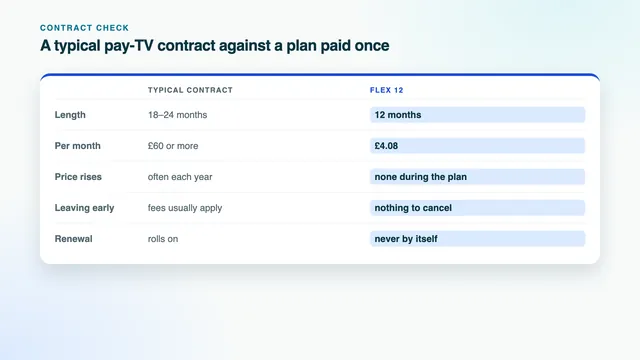
Sport has seasons; contracts do not. Football takes a summer break, cricket lives mostly in the British summer, and darts and snooker crowd into the colder months. A typical pay-TV contract charges the same each month through the quiet weeks, often with a price rise each year, and keeps going after the minimum term unless you cancel.
| Line | Typical pay-TV contract with sport | Flex 12 paid once |
|---|---|---|
| Commitment | 18 or 24 months | 12 months, then it simply ends |
| Monthly cost | £60 or more, at the time of writing | £4.08 across the plan |
| Quiet weeks between seasons | Charged in full | Part of a price already paid |
| A second room | Usually an extra monthly charge | Flex 12 Duo at £79 for the year |
| Price changes | Often each year | None during the plan |
| At the end | Rolls on unless you act | Stops by itself on the date the login message gives |
Over a long stretch of IPTV subscription UK sports, the gap is wide. Over 18 months, £60 a month comes to £1,080; over 24 months, £1,440. Flex 12 costs £49 for 12 months, about 13p a day, and Flex 24 costs £89 for 24 months. If you follow one sport for one stretch of the year, Flex 3 at £29 covers 3 months and then stops. Line them up in the four plans, read the plans page with each end date, or see what no contract means line by line.
Before kick-off: a ten-minute check
IPTV subscription UK sports evenings go best when the checks happen the day before, not at half-time. Run through these once, then again before a match that matters:
- Open the guide, search the team or the event, and check the start time in UK time.
- Set a reminder on the live entry, not the build-up.
- Play any sport channel for a minute and watch a slow pan: even movement means frame-rate matching is working.
- Measure the speed on the screen that will show the match, at the hour it will be on.
- Pause big downloads and updates in the house.
- With two TVs, decide which screen gets 4K and put it nearest the router.
- Read the end date in your login message, so the plan does not stop in the week of a big match. Ordering again later brings a fresh login message for the same apps.
- If anything looks wrong, message the team well before kick-off.
New to the apps? The setup guide walks through each type of screen, from the message on your phone to a picture on the TV, and the IPTV subscription UK home page sets a typical contract against Flex 12, line by line.
Frequently asked questions
Which sports are in the UK sport group?
The UK sport group carries the sports British viewers follow most, from football, cricket and rugby through to snooker, darts, golf, boxing, tennis and motor racing. What is on depends on each week’s fixtures, and the guide shows the next seven days in UK time. Sport also appears under other countries' groups, with commentary in their own language.
Is every match in 4K?
No. A match reaches 4K only when it was produced in 4K; most live sport is made in HD or Full HD. For the matches that are 4K, you also need a 4K set connected through HDMI 2.0 or a later port, hardware HEVC decoding and about 25 Mb/s of steady speed for that screen.
Why does my neighbour cheer before I see the goal?
A stream is encoded, carried and buffered before it plays, so it trails the aerial or satellite picture by anything from a few seconds to half a minute. That is normal. Turning off score alerts on your phone keeps the result a surprise.
Can two rooms watch different matches at the same time?
Yes: Flex 12 Duo lets two TVs in the home run different channels together for 12 months, at £79. With Flex 3, Flex 12 and Flex 24, one TV plays at a time. Both screens must be in the same household.
Do kick-off times shift when the clocks change?
No. The guide is in UK time, so listings follow GMT in winter and BST in summer. If every programme appears an hour out just after the change, correct it with the EPG time offset, one hour either way.
Is IPTV subscription UK sports viewing sold as a separate plan?
No. There is no sport-only plan and no monthly plan: Flex 3, Flex 12, Flex 12 Duo and Flex 24 carry the same channels, sport included, and differ only in length and screens. Each is paid once, with no direct debit and nothing that renews by itself.