
Length
A typical pay-TV contract asks for 18 or 24 months, owed whether the box is on or not. Flex 12 lasts 12 months, and those months are the entire commitment; the final day is written into the login message you get when you pay.
Paid once · no direct debit · login in 2 min
An IPTV subscription UK homes pay for once, with no contract signed and no monthly debit. IPTV Subscription UK 4K brings 40,000+ channels (Britain’s own groups listed before the rest), 120,000 films and series, a week of listings set to UK time and catch-up to the TV, stick or phone already in your home. Choose 3, 12 or 24 months, pay by card or PayPal, and read the plan’s last day in your login message.

No contractnothing to cancel
Contract check5 Nov 2026
| Line | Typical pay-TV contract | Flex 12 |
|---|---|---|
| Length | 18–24 months | 12 months |
| Per month | £60 or more | £4.08 |
| Price rises | often each year | none during the plan |
| Leaving early | fees usually apply | nothing to cancel |
| Renewal | rolls on | never by itself |
Flex 12, paid once£49Loginin 2 min
Start Flex 12Contract column: typical UK bundles with sport and films, at the time of writing.
Opens in these players



Contract check
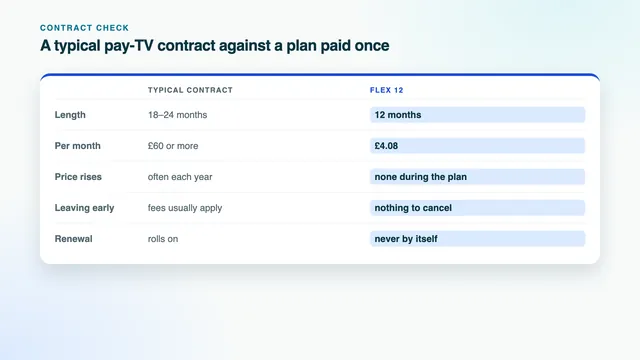
The card beside the hero photo lines up five things that decide what television really costs. The left column describes a typical British pay-TV deal, sport and films included, by dish or cable, at the time of writing; no company is named and your own deal may read differently. The right column is Flex 12, the IPTV subscription UK plan we suggest to most homes.
A typical pay-TV contract asks for 18 or 24 months, owed whether the box is on or not. Flex 12 lasts 12 months, and those months are the entire commitment; the final day is written into the login message you get when you pay.
Packages that include sport and films commonly cost upwards of £60 monthly, at the time of writing. Flex 12 is a single £49, which works out at 13p a day, or £4.08 per month, with the guide, catch-up and HD inside rather than sold as extras.
Many contracts let the monthly price climb, often once a year, under terms fixed when you signed. A plan settled before it starts has nothing left to raise.
Walking away inside a minimum term usually brings an exit fee. With Flex 12 there is no exit to arrange: stop watching in month five and nothing more is owed, with no form, no call and no notice period.
Once the minimum term is over, most contracts roll on month by month until you give notice. An IPTV subscription UK plan from us never renews by itself: on its last day it simply ends.
To be fair to pay TV, a contract normally covers the box and getting it working, often with recording built in, all on one bill. With a plan paid once you supply the screen, a player app and the broadband.
| Over 24 months | Typical pay-TV contract | Flex 12, ordered twice | Flex 24 |
|---|---|---|---|
| Paid in total | £1,440 or more, at £60 a month | £98 in two payments | £89 in one payment |
| Monthly average | £60 upwards | £4.08 | £3.71 |
| How you pay | Direct debit, every month | Card or PayPal, once a year | Card or PayPal, once |
| If you stop after a year | An exit fee usually applies | You simply do not reorder | Nothing more to pay; access runs on to its end date |
| When the term is over | Rolls on until you give notice | Stops on the written date | Stops on the written date |
A UK IPTV subscription paid in one go also changes who holds the switch. Money leaves your account only when you send a payment yourself, so there is no mandate to cancel and no letter to write when you move house or just want a break from television.
Plans
Flex 3, Flex 12, Flex 12 Duo and Flex 24 share one channel list, one 120,000-title library and one picture standard. What you are really choosing is a length, and whether one room or two will watch together.
3 mo
Short
A season, no contract
£29.00
£9.67 a month across the plan
Three months, no contract
One TV playing at a time
Money returned within 7 days if no screen plays
Pick Flex 3No contract, no direct debit
Our suggestion for most homes
12 mo
Suggested
A year paid in one go
£49.00
£4.08 a month across the plan
£67 saved vs 4 × Flex 3
One TV playing at a time
Money returned within 7 days if no screen plays
Start Flex 12No contract, no direct debit
12 mo
Two TVs
Two rooms watching at once, all year
£79.00
£6.58 a month across the plan
£153 saved vs 8 × Flex 3
Two TVs playing at once
Money returned within 7 days if no screen plays
Pick Flex 12 DuoNo contract, no direct debit
24 mo
Longest
Two years, lowest cost a month
£89.00
£3.71 a month across the plan
£143 saved vs 8 × Flex 3
One TV playing at a time
Money returned within 7 days if no screen plays
Pick Flex 24No contract, no direct debit
| Plan | TVs | Length | Daily | Monthly | Paid once | Versus Flex 3 back to back |
|---|---|---|---|---|---|---|
| Flex 3 | 1 | 3 months | £0.32 | £9.67 | £29 | — |
| Flex 12 | 1 | 12 months | £0.13 | £4.08 | £49 | saves £67 |
| Flex 12 Duo | 2 | 12 months | £0.22 | £6.58 | £79 | saves £153 |
| Flex 24 | 1 | 24 months | £0.12 | £3.71 | £89 | saves £143 |
Choosing a length. For one TV across a year, Flex 12 is the IPTV subscription UK plan we suggest first: £49 paid once, £4.08 a month, 13p a day, and £67 below four Flex 3 orders in a row.
Two people watching different things in two rooms at the same moment need Flex 12 Duo: £79 for 12 months, both screens live together. Allow about 20 Mb/s of steady broadband for two Full HD pictures, and 35 Mb/s if one of them plays in 4K.
Flex 24 costs least per month, £3.71, with £89 paid for two years, and suits a home whose set-up is already settled. Flex 3, £29 for 3 months, covers a short stretch, such as the weeks after a contract ends or a winter of weekend sport.
Put the player on every TV and phone you own; a single-screen plan streams to just one of them at a time.
What you get
Everything below arrives with one login. This site names no channel and no broadcaster; once your details are in the player, you will see the groups exactly as they are laid out here.
Live channels, 40,000+ of them, are filed by country and then by category, with the UK block opening the list. Other countries follow in that same order.
English for most of them; the remainder carry subtitles. Series open season by season.
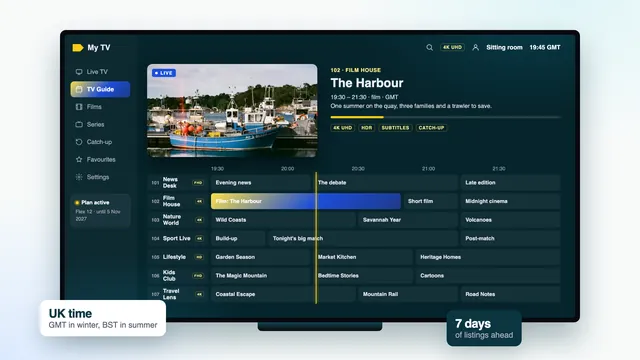
Seven days of listings on British time come with the Xtream login, and channels that keep recordings let you go back, usually up to a week.
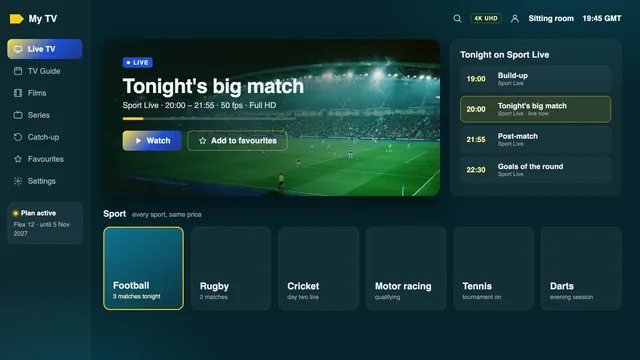
Darts, snooker, golf, cricket, rugby, football, tennis, boxing and motor racing, with 50 frames each second when the feed carries them.
| Group | What you find in it |
|---|---|
| Entertainment | General channels, quiz and talk shows, reality and comedy |
| News | Rolling national and international news, from breakfast to the late bulletin |
| Sport | Match channels and sports news for weekend afternoons and midweek fixtures |
| Films | Film channels arranged by genre |
| Drama and box sets | Series channels, old and new |
| Kids | Channels for pre-school and older children |
| Documentaries | History, nature, science and true stories |
| Music | Music video and radio-style channels |
| Nations and regions | Regional versions of channels, with local news and weather |
Listings keep UK time: GMT over the winter, then British Summer Time from late March, when the clocks spring forward, to late October, when they fall back. Right now it is GMT. Should programmes appear an hour early or late, after the clocks change or because a player has taken another time zone, go into the player’s settings and shift its “EPG time offset” one hour the right way. Check it again once the clocks next move.
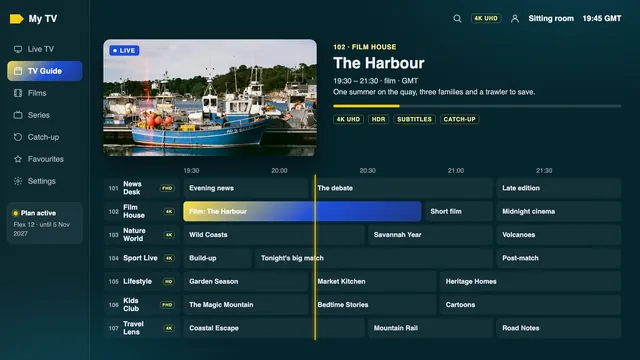
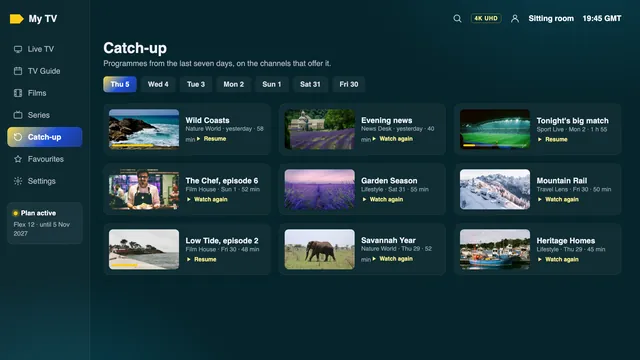
Catch-up depends on the channel: those that keep recent programmes carry a catch-up mark in the list. Open the guide, move back along the timeline and pick something that has already aired. Full players such as Smarters Pro and TiviMate do this; a plain playlist reader may not.
| Picture | Pixels | Speed per screen | When you get it |
|---|---|---|---|
| HD | 1280 × 720 | 5 Mb/s, held steady | The channel or title was made in HD |
| Full HD | 1920 × 1080 | 10 Mb/s, held steady | The source is Full HD |
| 4K UHD | 3840 × 2160 | 25 Mb/s, held steady | Source made in 4K; screen and device 4K-capable, linked by HDMI 2.0+; player decoding HEVC (H.265) in hardware |
| HDR, Dolby Atmos | — | — | The source offers it and both the player and the TV support it |
| 50 frames a second | — | — | Live sport, when the source allows it |
The 4K in our name is the ceiling, reached only where a programme was produced in 4K, and nothing on any plan is sent in 8K. Nor do we publish a count of 4K channels or films, since it shifts with what each source produces.
 Film night, picture set by the source
Ordering
This site has no basket and no account to create. You message the team, pay through a secure link, and the login follows within minutes.
Each IPTV subscription UK plan has its own button, which opens WhatsApp on the device in your hand. Rather use email? Write the plan’s name to [email protected].
WhatsApp shows the words ready to go, for instance “Flex 12 (12 months, £49)”. Add your TV model if you would like advice first.
Someone from the team replies, in English, with a secure link. It opens on the payment company’s site, where you choose debit or credit card or PayPal. We never see the card number, which stays on that site.
Online card payments in the UK usually need your bank’s say-so, through a banking-app prompt, a texted code or a card reader. A refusal generally means the fraud screening paused it; a tap in the app or a call to the bank tends to release it.
Day or night, the details land in your WhatsApp chat or inbox some 2 minutes after the bank confirms, the plan’s last day included.
Pick Xtream Codes as the login type in the player, then fill in username, password and server URL. If something will not take, the team talks you through it.
Because you pay once and up front, there is nothing to sign and nothing to approve on credit: nobody needs your bank account number, your address history or a direct debit mandate. A person reads each order before any payment link goes out, so mention a Fire TV Stick Lite or a 15 Mb/s line and you hear what it means for your picture while you can still change your mind.
The team is on 24/7, so a message sent at midnight is dealt with like one sent at noon. The payment company decides the name printed on your card statement; ask in the chat and you will know it beforehand.
Your login
Around 2 minutes after the payment clears, a single message comes through on WhatsApp or by email. It carries everything a player asks for, and the date your plan stops. The card here is dotted out.
Keep the message safe: a new TV, a reset stick or a fresh app install all ask for the same details.
What lands on your phone 2 minutes after paying
Dotted out here; the real details reach only you.
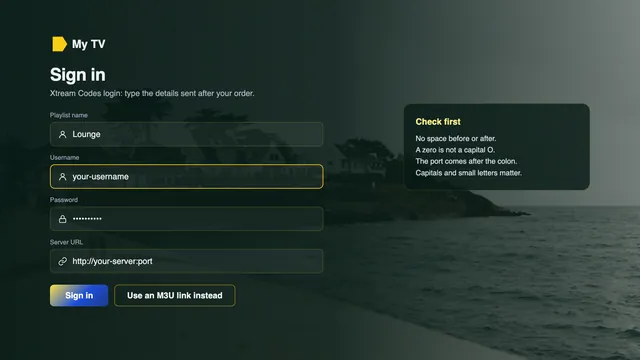
Type the server URL exactly as it is sent, with the http:// at the start and the port number after the colon. Most failed logins come down to a missing character there, or to a space copied by accident after the password.
Screens
No app here is ours, and we sell neither boxes nor sticks. Any compatible player opens the login, so the screen already in your home is usually enough. Choose its family below.
Three Amazon models output 4K with HDR when the stream carries it: the Fire TV Cube, the Stick 4K Max and the Stick 4K. The Lite and the plain sticks of earlier years max out at 1080p.
Amazon’s Appstore does not list Smarters Pro, so the route is Downloader, made by AFTVnews. Let Downloader install unknown apps under Settings › My Fire TV › Developer options, then type in the link supplied with your login.
Open About inside Settings › My Fire TV and select the device name seven times in a row; the missing menu then shows up.
A few of Amazon’s latest sticks use Vega OS, and Vega OS only accepts Appstore apps. Look up the model name before ordering a stick for this.
Everything installs from the App Store, where Smarters Pro is listed. The 4K box hands HDR to the TV whenever a programme has it.
In Settings › Video and Audio › Match Content, two switches deserve a tap: Match Frame Rate, then Match Dynamic Range. Sport at 50 fps and HDR films then reach the TV unaltered.
Tech Smarters Private Limited makes Smarters Pro; downloading it is free, and an in-app Premium is offered at a price each store sets. Similar names abound, so read the developer line first.
Apple-silicon Macs can run Smarters Pro, and free VLC plays the M3U link on most Macs.
Some Samsung models list Smarters Pro in their store and some do not; the country counts too. These panels handle HDR10+, though not Dolby Vision.
Availability works the same way on LG. Its OLED and QNED televisions do handle Dolby Vision.
You activate it once per television, then upload the playlist through the app’s website against that TV’s MAC address.
Pairs the playlist with a device key or with the set’s MAC address. When no app fits your TV, an Android box or a streaming stick on any free HDMI input takes over.
Install players through Google Play. TiviMate runs on both Android TV and Fire TV; the basic app is free and its premium options are paid.
Android TV or Google TV certification brings Google Play and security patches. On the spec sheet, check for 60 Hz 4K output, HEVC decoding in hardware, 2 GB of memory or more, a wired network port and 5 GHz Wi-Fi.
An APK from a forum thread may come with malware attached. Take players from the device’s built-in store and nowhere else.
On a PC, VLC plays the M3U link. Kodi needs one extra step: enable the PVR IPTV Simple Client add-on, then add the link.
A box or stick adds no channels: whatever a marketplace listing promises, the access is the login, and the device only plays it. Unsure what you have? Message the model name before ordering, and the team will say which player suits it and whether it can show 4K, so nothing gets bought twice.
Broadband
Your line carries every channel, so it matters more than the TV. The speeds below are steady figures, measured on the device that plays.
| On screen | Steady speed needed | Worth knowing |
|---|---|---|
| One TV in HD | About 5 Mb/s | Fine on most fibre lines, even in the evening |
| One TV in Full HD | About 10 Mb/s | The everyday picture for most homes |
| One TV in 4K | About 25 Mb/s | Needs a 4K screen, HDMI 2.0 or newer and HEVC decoding |
| Flex 12 Duo: two TVs in Full HD | About 20 Mb/s | Leave room for phones and laptops in use |
| Flex 12 Duo: one 4K, one Full HD | About 35 Mb/s | Measure both rooms, not just one |
| Flex 12 Duo: two TVs in 4K | About 50 Mb/s | Usually wants a cable to at least one TV |
British home broadband is under most strain between roughly 19:00 and 23:00, heaviest on Saturday and Sunday evenings and when a big match is on. A line reading 60 Mb/s at lunchtime can deliver far less at half past eight, so check the speed on the playing device itself during those hours, on two or three evenings.
British homes are sold two kinds of fibre line. With fibre to the cabinet, the fibre stops at the green cabinet in your street and old copper telephone wire covers the last stretch, so speed falls the further you live from it. With fibre to the home, often called full fibre, the fibre reaches inside the house, so distance costs nothing. Your broadband company can say which one you have.
Older houses are hard on Wi-Fi: solid brick or stone walls, chimney breasts and lath-and-plaster soak up the signal, and the router often sits by the phone socket in the hall. An Ethernet cable from router to TV settles it; otherwise use 5 GHz Wi-Fi no more than a room away, or bring the signal closer with powerline adapters or a mesh system.
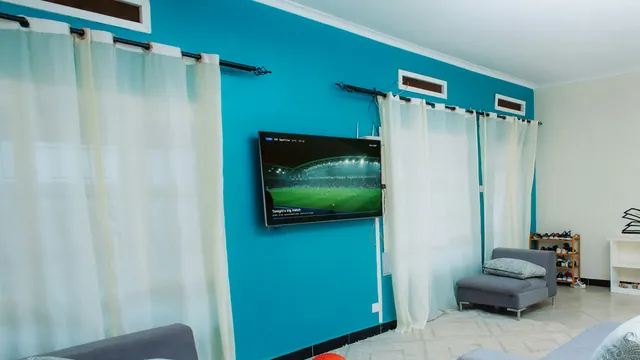 Match night: check the speed between 19:00 and 23:00
Live channels run behind the real broadcast, by a few seconds and at most around half a minute. If the neighbours cheer before you see the goal, that delay is the reason, not your line.
Switching
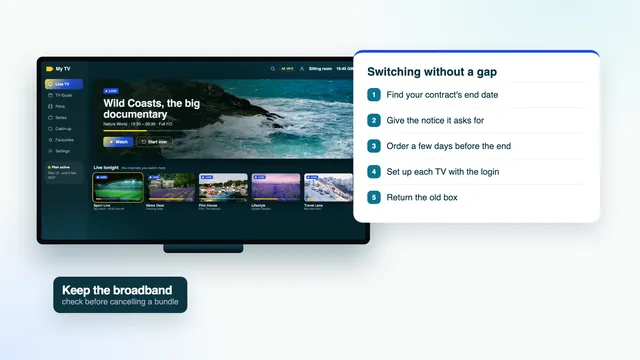
Leaving a contract for a UK IPTV subscription takes some paperwork. Done in this order, you keep watching the whole way through and never pay for two services for more than a few days.
Your minimum term’s last day is usually in your online account, on a recent bill or in the letter sent when the contract started.
Contact the company the way your terms describe, and ask for the date the service stops and any final bill in writing.
Ask how the equipment goes back and by when. Keep the proof of postage until the account shows it as received.
Order your plan a few days before the contract ends, so the players are set up while the old box still works.
Order a few days before the contract’s last day, not after it
Check the broadband before you give notice. When TV and broadband sit in the same bundle, ending the TV part can change the price of the line or give it an end date of its own. Your IPTV subscription UK plan needs that line, so make sure only the television side stops, and ask what the broadband will cost on its own.
Recordings saved on the old box go back with it. Watch the ones you care about, or let them go, before the return date. Catch-up covers the last seven days on the channels that keep it, which replaces much of what people used to record.
The overlap costs little: ordered five days early, Flex 12 has used about 67p of its value when the contract ends. With months still to run, simply wait and order when the date is close.
Price check
The four IPTV Subscription UK 4K plans beside a typical pay-TV contract and the prices UK sellers showed on offers online on 5 November 2026, every figure reduced to one month and one day.
| Option | Term | Paid | Per month | Per day |
|---|---|---|---|---|
| Flex 12 | 12 months | £49 | £4.08 | 13p |
| Flex 24 | 24 months | £89 | £3.71 | 12p |
| Flex 12 Duo (2 TVs) | 12 months | £79 | £6.58 | 22p |
| Flex 3 | 3 months | £29 | £9.67 | 32p |
| A single month, seen online | 1 month | £6.99–£22 each time | £6.99–£22 | 23p–72p |
| One screen for a year, seen online | 12 months | £39.99–£65, median about £55 | £3.33–£5.42 | 11p–18p |
| Two TVs, twelve months, offers online | 12 months | about £96–£100 | £8.00–£8.33 | 26p–27p |
| Typical pay-TV contract, sport and films | 18 or 24 months | £1,080–£1,440 or more | £60 or more | £1.97 or more |
When this page was written, UK offers online priced a one-screen year between £39.99 and £65, with the median close to £55; Flex 12 costs £49. A year of single months, at £6.99 to £22 each, passes £83.88 even at the cheapest. Two-screen years were listed at roughly £96 to £100, where Flex 12 Duo is £79. Prices vary by seller.
On the pay-TV side, at the time of writing, a cable or satellite package with sport and films can cost £60 a month or more on an 18- or 24-month term: at least £1,080 before any rise, usually with the box included. Two full years on Flex 24 come to £89, with the screen, player and line yours to supply.
 Flex 12: 13p a day, nothing after the end date
Before paying anyone, ours included, ask what speed your line needs and what happens on the end date. A seller who answers with numbers in writing is easier to hold to them later.
Help
Every IPTV subscription UK order comes with people to talk to before and after you pay, and a refund rule short enough to quote in full.
Write on WhatsApp or to [email protected] and a person replies in English, 24/7. Asking before you order is fine: a TV model and an evening speed reading give them plenty to go on.
A refund is due if your details were never delivered, or if every screen stays blank once the team has tried with you. No other case qualifies.
Refunds travel back along the route the payment took, to that card or PayPal account. No card is kept on file, so no later charge can appear.
| What happened | Money back? | Why |
|---|---|---|
| No login ever reached you | Yes, the full price | Claim inside 7 days of paying |
| Every screen stays blank, though the team stepped in | Yes, the full price | The plan could not play anywhere in your home |
| A change of heart | No | Working details were delivered |
| 4K stalls on a line under 25 Mb/s, after the needed speed was set out before payment | No | HD and Full HD play fine on that line |
Asking about a picture? Send the channel group, the time, the device model and a speed reading taken on it; that points to the line, the Wi-Fi, the player or the source in one go.
For any purchase online, start with the seller. If a service you paid for never came, the bank behind your debit or credit card may try to reverse the payment through a chargeback; every bank sets its own deadline, commonly near 120 days. The protection in Section 75 (Consumer Credit Act) only reaches credit-card purchases above £100 and up to £30,000, so plans priced under £100 sit outside it, though a chargeback can still be requested. Paying through PayPal? Its current terms explain what the buyer protection does and does not cover.
Reviews
★★★★★
A varied selection of British channels, international entertainment and sports. Plenty of different programmes to explore.
★★★★★
The movie library is interesting, with different genres and plenty of series to browse. A useful entertainment catalogue.
★★★★★
I mainly look for football and sports programmes. The range of sports categories is a nice feature.
★★★★★
The application is easy to navigate on my streaming device. I like how the different entertainment categories are organised.
★★★★★
Good variety of international content, movies and documentaries. There are plenty of different options to explore.
★★★★★
I particularly like the selection of films and television programmes. Having different categories makes browsing more convenient.
FAQ
Live TV and on-demand titles that reach a player app through your broadband line, with no dish and no cable box. IPTV Subscription UK 4K sells it in fixed lengths of 3, 12 or 24 months: 40,000+ channels, 120,000 films and series to pick from, a week of listings on British time and catch-up where channels keep it.
None at all. You sign nothing, set up no direct debit and commit to no minimum. One payment by card or PayPal buys the plan, and it stops on the date your login message gives.
It cannot: no card is stored and nothing is set to repeat. Want more time later? Order again; the team sends a new username and password for the apps already installed.
£29 buys Flex 3, three months on one screen. Flex 12 costs £49 for a year (£4.08 a month), Flex 12 Duo £79 for a year on two TVs together, and Flex 24 £89 for two years. You pay one time for each.
No. You pay the full price before the plan starts, so there is nothing on credit to approve. Nobody asks for your bank account details or your address history.
Usually within 2 minutes of the payment going through, at whatever hour, the login comes by WhatsApp or email. Waiting on an email? Check the junk folder before anything else.
The guide keeps British time: GMT in the winter, BST over the summer months. Listings sitting an hour early or late are fixed with one change to the player’s “EPG time offset” setting.
For each screen, count on a steady 5 Mb/s in HD, 10 Mb/s in Full HD or 25 Mb/s in 4K, taken on the TV itself in the evening peak. Wire the TV to the router if you can; if not, keep it within easy reach of the router’s 5 GHz Wi-Fi.
Yes, on Flex 12 Duo, which costs £79 a year and keeps two pictures running together. The three other plans stream to one screen at a time. All four are for a single household.
Yes, within 7 days of paying, in two cases: no login ever arrived, or not one screen shows a picture after the team has helped. Changing your mind does not qualify, and nor does slow 4K on a line already below the speed explained before you paid.
Guides
Ten guides, each on one British detail, from contracts and switching to the TV guide, regional channels, sport and broadband.
 UK guide
 UK guide
 UK guide
13p a day for twelve months of television on one screen. Ordered on 5 November 2026, access would last until 5 November 2027 and then close by itself: no charge follows and no letter is needed. Expect the login roughly 2 minutes after paying.
Flex 12: £4912 months · £4.08 a month
Order