
Username
Who you are, as far as the server is concerned. Capital and small letters count as different, so « Uk8 » and « uk8 » would be two separate users.
Setup
This IPTV subscription UK setup page starts where the order ends, with a message on your phone, and stops once a live channel is playing on the TV. Each screen takes ten to twenty minutes: one app to fetch, three short details to enter, a listings grid to match to British time and a handful of settings for a steadier evening picture.
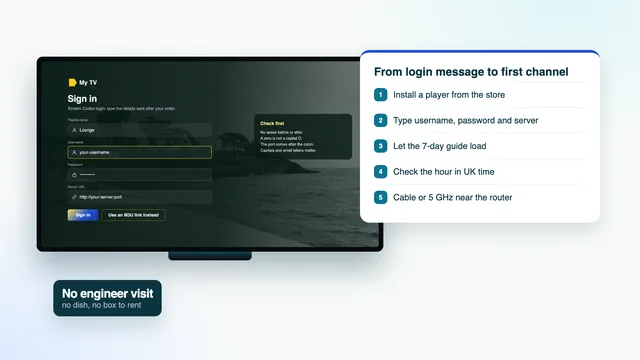
Getting ready
An IPTV subscription UK setup goes quickest when these are sorted before you pick up the remote.
When a setup drags on, the cause is rarely the TV itself. More often the message has slipped up the chat, nobody is sure which model sits under the screen, or someone is entering a forty-character address letter by letter with the arrow keys.
Find the model number first. Settings usually show it under About or Support, and there is a label on the back panel. Knowing it tells you which player your set can run before you go hunting in a store.
Typing is the slow part. Many TV brands have a phone app that doubles as a remote with a keyboard, and most Android boxes accept a cheap USB keyboard. Without either, take your time and compare every character with the message before you confirm.
Step by step
Whatever sits under your TV, the route is the same. The device cards further down cover the two steps that differ: which player, and where it comes from.
It comes 2 minutes or so after your bank approves the payment, by WhatsApp or email. Leave it on screen, because three of its lines are about to be copied across.
It has to install on this screen and take an Xtream Codes login. The device cards further down name sensible players for each family.
Apple hardware uses the App Store; Android boxes, phones and TVs use Google Play; Samsung and LG sets have stores of their own. Fire TV is the odd one out: Downloader goes on first, then the player, from a link in your login message.
Players word it in different ways, « Xtream Codes API » or « Login with Xtream » among them. Choose it over adding a playlist whenever both are offered.
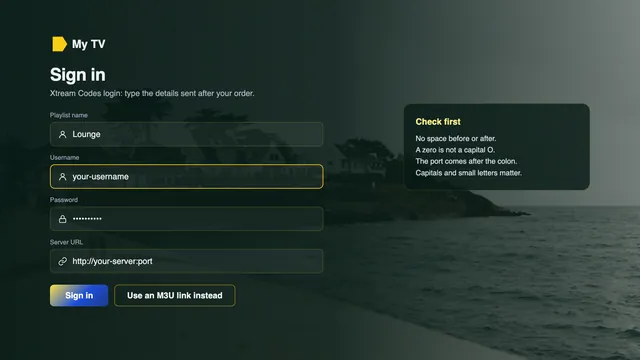
Copy the server address whole: http:// at the start, a colon and the port number at the end. Capitals matter in the username and the password. Name the profile whatever you like, « Front room » for example.
On the first run the player pulls in every channel group, all the films and series, and seven days of listings. Give it a minute or so before pressing anything.
Pick any programme and compare its start with the time on your phone. A neat one-hour gap means the EPG time offset in the player needs moving by an hour.
Output on Auto, or 2160p on a 4K set; frame-rate matching switched on; the player decoding in hardware; and the box on a network cable or on the 5 GHz band.
Start a UK news channel live, then step back a day in the guide and replay a programme. When both play, move on to the next screen.
The first three steps are done once on each device, the next four once in each player, and step 8 again only when a TV or box is replaced. Prefer someone alongside you? The team will talk you through it on WhatsApp, a screen at a time. Not ordered yet? See what the IPTV subscription UK login opens on the home page.
Your details
Three of the six lines do most of the work in an IPTV subscription UK setup. The rest serve playlist-only players, the programme guide and your diary.
Most players only need the first three lines, which together form what is called an Xtream Codes login. The playlist (M3U) and guide (EPG) links exist for apps that cannot take that kind of login, and the final line is simply the date your plan runs out.
Copy the message somewhere other than the chat: a notes app, a password manager, or a printout tucked in a kitchen drawer. A replacement TV next year needs nothing more than those lines.
The plan belongs to one home. If the same details start playing at another address, or are posted where others can read them, the team can suspend them.
Your login message, about 2 minutes after the payment clears
Shown with placeholders: the real values are sent to you alone.
Who you are, as far as the server is concerned. Capital and small letters count as different, so « Uk8 » and « uk8 » would be two separate users.
Case-sensitive like the username. Players often show dots while you type it, so paste it in if the device has a clipboard.
Follows the pattern http://your-server:port. Leave out the http:// or the digits after the colon and the player has nowhere to connect.
A single long web address carrying the entire channel list. VLC, Kodi and Smart IPTV read it, along with any player that lacks an Xtream option.
Seven days of listings in XMLTV form, needed only by players fed through the M3U link. An Xtream login fetches them without it.
When the plan finishes. It does not renew; a future order comes with new details for the apps you already have.
Devices
Any player below takes the same login, so the IPTV subscription UK setup only changes at steps 2 and 3. Find the family your screen belongs to.
Amazon’s own app store does not stock Smarters Pro. The way in is Downloader, an AFTVnews app found in the Appstore. Developer options (under Settings, then My Fire TV) holds a switch called Install unknown apps: turn it on for Downloader. No Developer options entry? Under My Fire TV › About, select the name of the device seven times in a row and it appears. Your login message carries the link to type into Downloader. 4K HDR (where the source has it) needs a Cube, a 4K Max or a Fire TV Stick 4K, while a Lite or an entry-level stick manages Full HD at most. A handful of newer Amazon models are built on Vega OS, where only Appstore apps install, so read the model name before buying one.
On Samsung sets, whether Smarters Pro shows up in the store varies with the model and the country. Two players fill the gap on most TVs. Smart IPTV is activated once on each set, and the playlist is then uploaded on the Smart IPTV website against the TV’s MAC address. IBO Player works in a similar way, pairing your playlist with the TV’s MAC address, or else with a device key it shows on screen. On picture formats, Samsung supports HDR10+ and leaves out Dolby Vision.
webOS behaves much like Samsung’s system here: Smarters Pro may or may not be offered for your model and country, and Smart IPTV or IBO Player usually fill in. OLED and QNED televisions from LG handle Dolby Vision. When no app fits, an HDMI port and a streaming stick or Android box get round the problem.
Here everything comes through Google Play: IPTV Smarters Pro, XP IPTV and TiviMate are all there, the last free with optional paid extras. Leave alone any APK that someone shares on a forum, since that is how malware travels. Boxes certified for Android TV or Google TV go on getting Play Store and security updates; plenty of uncertified ones are stuck on old Android.
Only the App Store can install apps on Apple hardware, and at the time of writing it lists both VLC and IPTV Smarters Pro. On the Apple TV box, in the Video and Audio section of Settings, open Match Content; switch Match Frame Rate on, then Match Dynamic Range, and football made at 50 frames reaches the TV at 50.
On Windows and Mac computers, and on Android and iOS too, free VLC opens the M3U link. Kodi can read the same link after you switch on its PVR IPTV Simple Client add-on. Keep a phone in mind for a quick diagnosis: when the details play on the phone but not on the TV, the login is sound and the fault is at the TV end.
When searching a store, look for « Smarters Pro » with Tech Smarters Private Limited named as the developer, as copies with near-identical names and logos are about. Downloading it is free; there is an optional Premium upgrade inside the app, with the price set store by store, and the app holds no channels until your login goes in.
No app on any store is ours, and we do not sell hardware either. If a box is on your list, the spec sheet should show 4K output at 60 Hz, hardware HEVC (H.265) decoding, 2 GB of RAM or more, a network socket and 5 GHz Wi-Fi. A box brings no channels with it; everything comes from the login.
Signing in
Whenever a player gives you the choice, take Xtream Codes. You get separate menus for live TV, films, series and catch-up, and the listings arrive with no further address to paste.
Keep the M3U link for players that read playlists and nothing else, such as VLC, Kodi and Smart IPTV. There the guide needs its own EPG link, and films can end up mixed into the long channel list.
A refused login almost always comes down to a single character. Look for a lost http://, a port that never got typed, a stray space at the end, or a zero typed as the letter O. Pasting from the message removes most of these.
| Question | Xtream Codes | M3U link |
|---|---|---|
| Lines from the message | Lines one to three | Line four, plus line five for listings |
| What the menu calls it | Login with Xtream, or Xtream Codes (API) | Remote playlist, M3U URL, Add playlist |
| Listings | Fetched with the login | EPG link pasted into the guide settings |
| Catch-up | Shown on channels that keep an archive | Often absent, depending on the app |
| Common players | XP IPTV, TiviMate, IPTV Smarters Pro, IBO Player | Smart IPTV, Kodi, VLC |
Listings
Sign in with Xtream and the player collects a week of listings unprompted, already set to British time. On the M3U route, the EPG link goes into the guide section of the player’s settings; allow a minute or two for the grid to fill.
British time switches twice a year. From the last Sunday in March the clocks run one hour ahead on BST, and from the last Sunday in October they fall back to GMT. On 5 November 2026, the date of the latest review of this page, the country was on GMT, and the next change is due on 28 March 2027, when the clocks go forward.
A grid that is off by precisely an hour has good data and a wrong setting. Check first that the device itself is set to the London time zone. If the hour persists, shift the guide offset in the player (labelled EPG time offset or EPG shift) by one, and reverse it if the error grows to two hours.
Reminders, favourites and reading the grid quickly have a page of their own: the guide to the seven-day TV guide in UK time.
| Symptom | Reason | Remedy |
|---|---|---|
| All programmes one hour early or late | The player has not followed the clock change | Move the EPG offset one hour either way |
| Hours out by more than one | A foreign time zone on the device | Choose London as the zone, then refresh the listings |
| Blank grid when using the M3U link | EPG link never added | Paste line five of the message into the guide settings |
| Only one or two days listed | Listings download cut short | Ask the player to update the guide again |
Catch-up
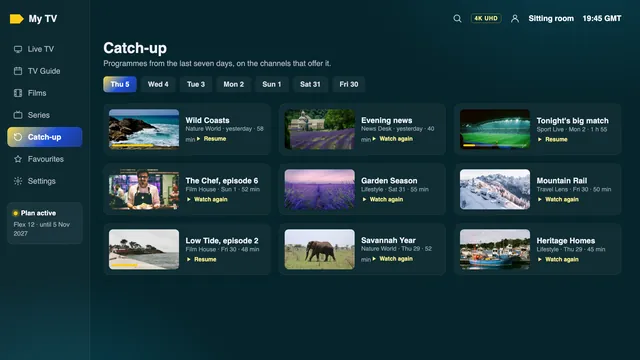
Channels that keep an archive are marked in the guide, usually by a little clock or rewind icon next to the channel. Scroll left into the past few days, choose a programme, and it plays from its opening titles.
Archives normally reach back about a week, and some channels have none at all. Catch-up shows most reliably with the Xtream login; playlist-only players often leave it out.
No symbol anywhere? Update the player and sign in with Xtream rather than the M3U link. Our catch-up guide looks at which kinds of channel tend to keep an archive and how each player displays it.
Picture
| Setting | Where to find it | Choose |
|---|---|---|
| Resolution | Apple TV: Video and Audio › Format. Fire TV: Display & Sounds › Display | Auto, or 2160p on a 4K set; never locked at 720p |
| Frame rate | Apple TV: Match Content. Fire TV: Match Original Frame Rate | On, so 50 fps football is shown at 50 Hz |
| HDR | Apple TV: Match Dynamic Range. Fire TV: Dynamic Range Settings | Follow the programme, so HDR only lights up on HDR titles |
| Decoding | Playback options inside the player | Hardware (HW) first; software only when a channel refuses to start |
| HDMI port | Input or external-device settings on the TV | HDMI 2.0 or above for 4K, with its enhanced signal mode on |
| Motion smoothing | Picture menu of the TV | Off or low if football looks oddly fluid |
Start with resolution. A box locked to 1080p shrinks each 4K title to Full HD before it ever reaches the TV, and one locked to 720p blurs ordinary HD as well.
Most British broadcasts are produced at 50 frames a second. Forced through a 60 Hz output, they pick up a faint stutter on every pan across the pitch; frame-rate matching removes it.
HDR belongs to the programme, not the device. Left permanently on, it makes everyday HD look grey and murky. For 4K pictures, check two more things: HDMI 2.0 or newer on the TV or box, and HEVC (H.265) decoded by the hardware rather than by software.
Connection
| Quality | Speed the device should hold | Link that copes |
|---|---|---|
| HD | Around 5 Mb/s | Wi-Fi on 2.4 or 5 GHz |
| Full HD | Around 10 Mb/s | Wired, or Wi-Fi on 5 GHz |
| 4K UHD, one screen | Around 25 Mb/s | Wired, or 5 GHz in the same room as the router |
| Flex 12 Duo, both TVs busy | Add the two speeds together | Wire at least one of the two |
Wire the TV or box to the router if you can; a network cable cures most evening stalls on its own. When it cannot reach, use the 5 GHz band from as near the router as possible, since it moves more data than 2.4 GHz but loses strength through brick.
Long terraces, loft conversions and flats with thick walls tend to need powerline adapters or a mesh system rather than a bigger router. Do the speed reading on the TV or the stick, at some point between 7 pm and 11 pm, when UK lines are at their busiest; weekends and big match nights are the heaviest of all.
Fibre to the cabinet and fibre to the home behave differently in the evening; our broadband guide for UK homes explains both in plain terms.
First night
A short round of checks tonight heads off most of the questions people send later. Begin with the listings: does the programme on now match what the guide says is on now?
Next, scroll to the British groups that open the channel list, nations and regions included, and try one channel from each. The regional channels guide explains where your own area’s group is kept.
If football or rugby is the reason you ordered, put a live match on during the evening rush and read the frame rate in the player’s info panel. The sports guide goes through kick-off times in UK time and two TVs on a match day.
Live streams trail the broadcast a little, usually by a few seconds and occasionally by up to half a minute. That gap is part of how streaming works, not a fault.
Troubleshooting
If part of the IPTV subscription UK setup misbehaves in the first week, it is probably listed here. Try the last column before messaging; it often saves a round trip.
| Symptom | Usual reason | Fix to try first |
|---|---|---|
| The player rejects the login | A single wrong character in the address, username or password | Look again at http://, the port, capital letters and spaces; paste instead of typing |
| Groups appear but nothing plays | A decoder setting, or an old version of the player | Install the latest version, swap between hardware and software decoding, then restart the box |
| Pictures freeze every few minutes after dark | Wi-Fi too weak where the TV is | Wire it, move to 5 GHz, shift the router or add powerline |
| Guide one hour out | GMT and BST mixed up | London time zone on the device, then the EPG offset |
| No catch-up symbol anywhere | Playlist sign-in, or a channel with no archive | Sign in with Xtream and try a channel that keeps one |
| 4K set, soft picture | Output locked at 1080p, or an HD programme | Set Auto or 2160p, then read the player’s info panel |
| Login message missing | Junk folder, a different chat, or the payment still awaiting approval | Look in junk, open your banking app, then message us |
Nothing working yet? Tell the team the model of the device, which player you used and the step where it stopped, and attach a phone photo of the TV. They will work through it alongside you. Should every screen in the house still stay blank after that, the 7-day refund rule covers you.
FAQ
Easily. A phone, an Apple TV or an Android TV box usually takes about ten minutes, and a Fire TV a little longer the first time, since the developer option and Downloader come before the player. Even a house with several TVs is normally done before the main programme of the evening starts.
Yes: each one gets its own player, and all of them use one login. A single-TV plan streams to one screen at any moment, while Flex 12 Duo lets two play at once.
Most players have a parental PIN in their settings that locks the groups you choose. Our family viewing guide shows where to find it and how to build a kids' favourites list.
Yes. Over WhatsApp, a team member talks you through it as you work the remote: the app to choose, where each line of the message goes, the setting to change next. A photo of the TV screen makes it quicker.
No reinstalling is needed. The new message carries a fresh server address, username and password; swap them into each player, or add them as a new profile and remove the old one.
Choose a plan, pay once, then follow this IPTV subscription UK setup on each screen. If nothing shows on any of them even with the team’s help, you can ask for a refund within 7 days.